
RevXStar
BlogAbout usHelp Center
Back to discoveries
AI & Software / CREATOR FINDS

Vista Social | All-in-One Social Media Management Platform

Plan and publish social content, manage conversations, monitor performance, and collaborate with your team using Vista Social. The platform brings publishing, engagement, analytics, social listening, review management, and reporting together in one workspace for businesses, agencies, and marketing teams.

Watch full product video

The creator may earn a commission if you buy through these links. Learn more.

Go for Subscription Checkout takes place on the seller’s website. This link may be an affiliate link.
A CLOSER LOOK

Vista Social Social Media Management Platform

Creator-edited product details · 10/25/2026

01 / PRODUCT DETAILS

The AI Social Media Manager

Meet Vista Social, the AI-powered social media manager built to help teams do more with every post. Plan content, manage social channels, and keep your workflow organized from one platform. The visual highlights Vista Social’s modern dashboard and its promise of more depth and reach for your social strategy. Whether you’re a creator, small business, or agency, bring everyday social tasks into a more connected workspace. Spend less time moving between tools and more time creating useful content, building stronger audience relationships, and growing your brand across the channels that matter.
The AI Social Media Manager
02 / PRODUCT DETAILS

Create Visuals Where You Post

Create social visuals as part of your publishing workflow. Vista Social’s post composer brings your content and creative tools together, helping you prepare images and videos while building a post. Start with an idea, add your copy and media, then tailor the content for the social platforms you select. The streamlined workspace makes it easier to move from concept to ready-to-publish post without losing track of the details. Use this feature to keep your content creation process organized and produce platform-ready posts with less switching between apps. Your team can focus on sharing clear, engaging content with its audience.

Create Visuals Where You Post
03 / PRODUCT DETAILS

What Will You Create

Turn a simple prompt into a starting point for fresh social content. Vista Social’s AI image and video generation tools can help you explore creative directions, visualize product ideas, and develop content concepts for your channels. The examples show how written prompts can inspire images and video previews, giving your team material to refine and adapt. Use AI to accelerate brainstorming and help overcome the blank-page moment, while applying your own brand voice and creative judgment before publishing. From product showcases to seasonal campaigns, build a more flexible content workflow and discover new ways to bring your ideas to life.

What Will You Create?
04 / PRODUCT DETAILS

Generate Images and Videos

Bring a visual idea to life with AI-assisted image and video generation. Describe the scene or concept you have in mind, then use Vista Social’s creative tools to explore a visual direction for your next post. The examples show how a prompt can inspire content for different themes, from festive displays to warm interior scenes. This can help social teams move quickly from an initial idea to a draft worth refining. Review the results, make adjustments, and shape the final creative to suit your brand and audience. Keep ideation and social content preparation together in one connected workflow.

Generate Images and Videos
05 / PRODUCT DETAILS

Unleash Your Creative Potential

Explore a range of visual ideas for your social content without juggling separate creative tools. Vista Social brings AI-assisted image and video creation into the social workflow, helping you experiment with different concepts and formats. The examples suggest possibilities for product imagery, lifestyle content, and event scenes, giving teams inspiration for upcoming posts. Start with a prompt or an early idea, generate a visual draft, and refine it to match your message. AI can help speed up exploration, while your team chooses what fits the brand. Make room for more creative options and keep your content planning moving.

Unleash Your Creative Potential
06 / PRODUCT DETAILS

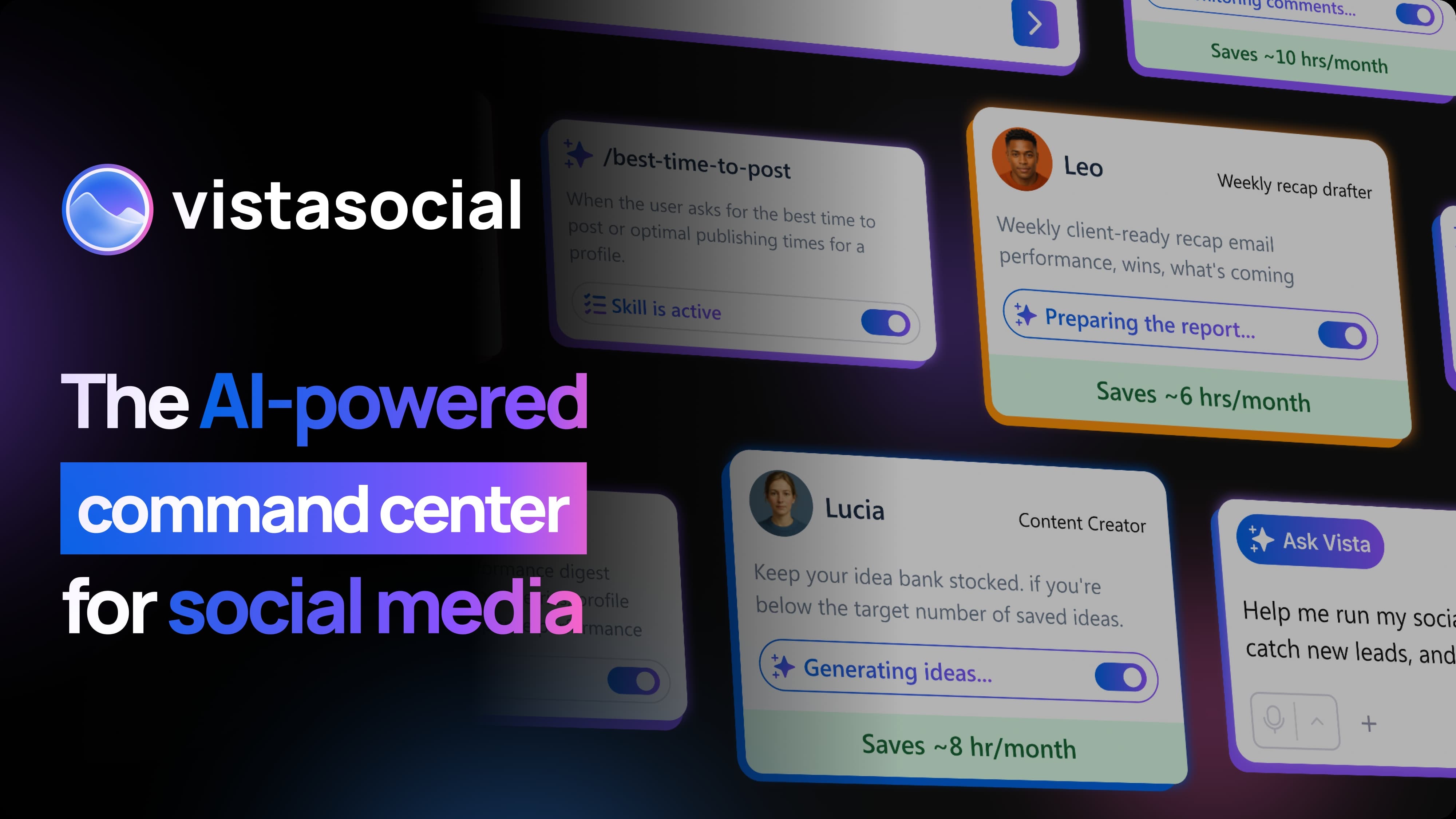
The AI-Powered Command Center for Social Media

Manage social media work with an AI-powered command center designed to bring tasks and team activity together. Vista Social can help teams coordinate content, review work, and handle recurring social tasks in one organized space. The visual highlights AI agents supporting different parts of the workflow, from preparing reports to generating ideas and assisting with routine actions. This gives teams a clearer way to manage multiple responsibilities and focus attention where it matters most. Use intelligent assistance to reduce repetitive work, keep projects moving, and make more time for strategy, creativity, and meaningful engagement with your audience.

The AI-Powered Command Center for Social Media
07 / PRODUCT DETAILS

AI Agents

Give your social team more room to grow. Vista Social’s AI agents can help with routine tasks, including creating posts, drafting replies, analyzing results, and supporting social workflows. By bringing assistance into the platform, teams can spend less time on repetitive work and devote more attention to clients, campaigns, and brand building. The image shows a team collaborating with AI tools, reflecting how automation can support people rather than replace their judgment. Use AI to increase capacity, keep work organized, and respond to opportunities faster. Your team remains in control of the ideas, voice, and decisions behind every interaction.

AI Agents. More Capacity.
08 / PRODUCT DETAILS

Make It Perfect

Refine a visual with a simple instruction. Vista Social’s AI editing tools let you describe a change and generate an updated version, making it easier to explore creative adjustments. The example shows two versions of a festive scene alongside a prompt for changing the image. This kind of editing can help teams test new looks, adapt content to a campaign, or polish a visual before sharing it. Review each result and make sure it fits your brand and the post’s purpose. With AI-assisted editing in your workflow, creative iteration can feel more accessible and less time-consuming.

Make It Perfect
Make It Perfect
09 / PRODUCT DETAILS

One Platform

Plan, publish, and measure social content from one connected platform. Vista Social brings a publishing calendar and analytics into a shared workspace, helping teams organize upcoming posts and review performance. The visual shows content planning alongside reporting, with icons representing multiple social channels. This unified view can make it easier to coordinate campaigns, maintain a consistent posting rhythm, and understand how content is performing. Instead of managing each task in isolation, keep scheduling and measurement connected. Use the overview to support better planning, clearer collaboration, and informed decisions about what to publish next across your social presence.

One Platform. Every Social Channel.
10 / PRODUCT DETAILS

Make It Perfect with AI Editing

Give your visual a new direction by describing the change you want to make. Vista Social’s AI editing workflow lets you compare an original image with an updated version, helping you explore creative options before a post goes live. The example uses a festive market scene to demonstrate how a prompt can guide an edit. This makes it easier to test variations, adjust a visual to fit a campaign, or develop a more polished piece of content. Review the result, refine your instructions if needed, and choose the version that best matches your brand and message.

Make It Perfect with AI Editing

Product story

Vista Social helps marketing teams manage social media work in one place. Create and schedule content, coordinate approvals, respond to conversations, and review performance across connected social profiles. Its features support solo marketers, agencies, multi-location businesses, and larger teams.

Features & benefits

  • - Schedule and publish content across supported social networks
  • - Plan posts with a shared content calendar and publishing queues
  • - Draft, review, and approve content with teammates or clients
  • - Manage supported messages, comments, and reviews through a unified inbox
  • - Review profile and post performance in analytics and reports
  • - Use social listening and review management tools
  • - Access the platform through web, desktop, and mobile apps Vista Social
  • - Coordinate multiple social profiles from one workspace
  • - Organize content plans and publishing schedules
  • - Keep team members aligned through approvals and shared calendars
  • - Respond to supported social conversations more efficiently
  • - Use performance reports to inform future content planning

About this product

Vista Social combines social publishing, engagement, analytics, social listening, review management, and reporting in a shared platform. Supported social networks and available tools depend on the connected profile and account plan.

Teams can draft and schedule posts, organize content in a shared calendar, and set review and approval workflows. A unified inbox brings supported messages, comments, and reviews into one place for management and response.

Product specifications

Product type:
Social media management software
Access:
Web, desktop, and mobile apps
Core tools:
Publishing, scheduling, inbox, analytics, social listening, reviews, and reporting
Collaboration:
Shared calendars, approvals, permissions, and team workflows
Network support:
Varies by feature, connected account, and platform API
Plans and limits:
Features and profile limits vary by subscription; check Vista Social’s current pricing and plan details before subscribing.
Confirm current prices and specifications with the seller before buying.

The creator may earn a commission if you buy through these links. Learn more.

Go for Subscription

Creator product reviews

No reviews yet. Share your experience.

Comments (0)

Loading comments…

Sign in to comment